


TL;DR:
- MTD Income Tax is live from 6 April 2026 for sole traders and landlords with qualifying income over £50,000; the threshold drops to £30,000 in April 2027 and £20,000 in April 2028.
- You file five submissions a year: 4 quarterly updates plus a final declaration ( your tax return) by 31 January.
- Quarterly updates are cumulative, which means each one is a running total from the start of the tax year, not just the latest three months.
- Spreadsheets are allowed. You do not need full record keeping software like QuickBooks or Xero; just use bridging software to connect your spreadsheets to HMRC.
- Your first deadline is 7 August 2026.No penalty points are applied to a late quarterly update in the first year, but do not leave it until too late.
Making Tax Digital for Income Tax starts on 6 April 2026 for sole traders and landlords whose qualifying income from self-employment and property is more than £50,000 and are required to keep digital records and submit quarterly updates to HMRC using recognised software. From 6 April 2027, the threshold drops to £30,000, and April 6 2028 brings it down to £20,000. You can check if and when you need to sign up on GOV.UK.
For accountants, MTD for income tax is not just a filing change. It also changes how clients need to prepare records throughout the year.
Despite MTD being here, the same questions keep coming up on calls, in forums, and in accountant conversations across the UK. Not because people are not paying attention, but because a lot of guidance out there is unclear, contradictory, or written to sell a particular type of software. This guide is here to cut through that.
We cover the biggest confusion points, explain what cumulative reporting actually means, what the fifth submission is, whether you need full accounting software, and how to get started step by step, with nothing left out.
Try AbraTax for MTD Income Tax for free
1. The biggest MTD Income Tax confusion points:
These are the questions that come most often. If you have asked any of them, you are not alone.
Do I submit quarterly or yearly?
Quarterly. Under MTD for income tax, you submit updates of your income and expenses four times a year. These replace the old once-a-year only rhythm for MTD income sources, but they do not replace the final tax return. Quarterly updates are summaries of income and expenses, not tax returns. For MTD-mandate income sources, there is still a year-end submission, but it is called a final declaration rather than a self-assessment return.
What is cumulative reporting? I thought it was just the quarter.
Each quarterly update you send to HMRC is not just the figures for the three months; it is the running total from the start of the tax year up to the end of that quarter. This confuses a lot of people. We cover it in detail in Section 2.
What is the 5th submission? I thought there were only four
MTD has four quarterly updates, but there is a fifth submission at the end of the tax year called the final declaration. This is where you confirm your figures, add any non-mandated income, and make any adjustments that work similarly to the current self-assessment return. We cover it fully in Section 3.
Do I need special software? I assumed I had to use something like QuickBooks.
No, you do not need full accounting software. If you already use spreadsheets to track your income and expenses, you can continue doing exactly that. You just need bridging software to connect your spreadsheet to HMRC. We cover this in Section 4.
How do I even start? This is what Section 6 is for. We walk through every step.
2. What does MTD cumulative reporting really mean?
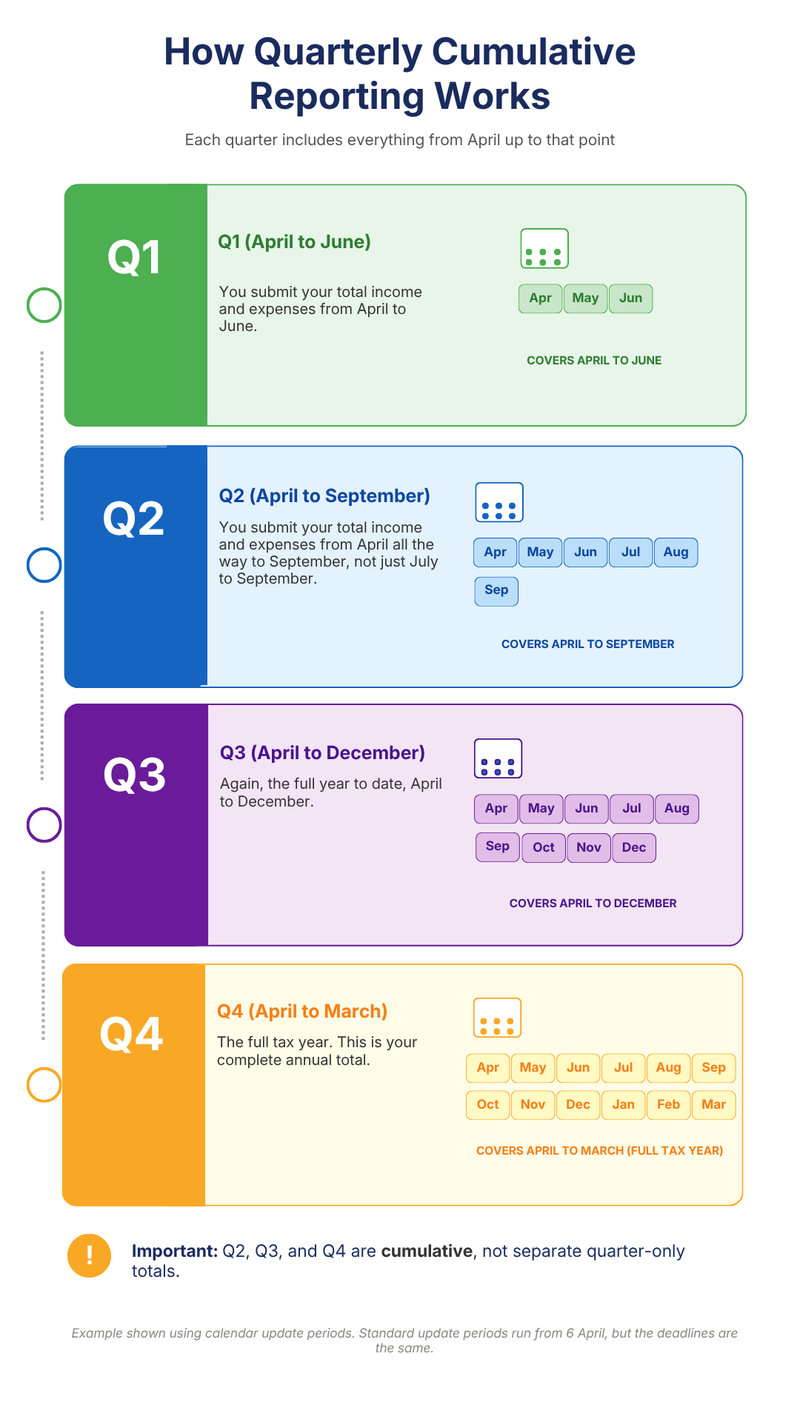
This is where most people get confused. Under MTD, you do not just send the figures for each individual three-month window; you send a running cumulative total from the start of the tax year up to the end of that quarter. Here are the MTD quarterly update deadlines for calendar update periods:
| Update type | Calendar update period | Deadline |
|---|---|---|
| Q1 | 1 April to 30 June | 7 August |
| Q2 | 1 April to 30 September | 7 November |
| Q3 | 1 April to 31 December | 7 February |
| Q4 | 1 April to 31 March | 7 May |
Note: The above example uses calendar update periods. Standard update periods run from 6 April to 5 July, 6 April to 5 October, 6 April to 5 January, and 6 April to 5 April. Deadlines are the same.
Why does HMRC do it this way?
Because each update helps create a running estimate of your tax bill based on the record submitted so far.
You can see this estimate in the Calculations tab in AbraTax. After each quarterly update, a live view of your estimated profit tax due and NIC is based on everything you have filed so far.
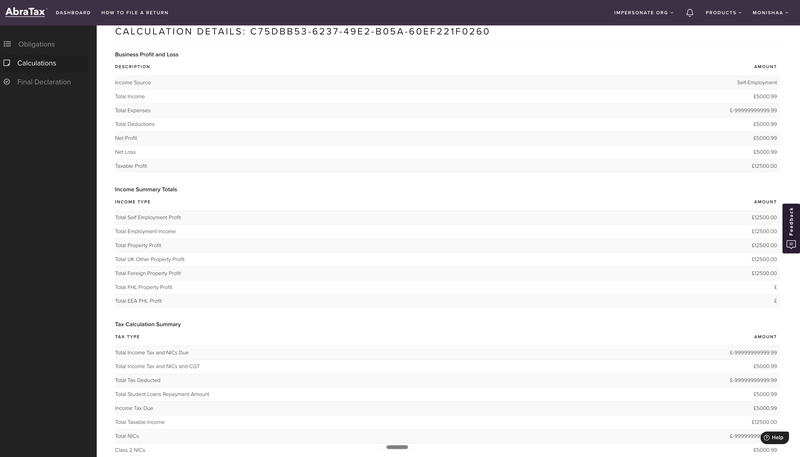
The practical implication is that your template needs to reflect cumulative totals, not just the quarter in isolation. If you use the AbraTax template correctly, linking it by formulas to your records rather than retyping figures, this happens naturally.
3. The fifth submission: The end-of-year tax return and final declaration
Most people know about the four quarterly updates; fewer people understand what the fifth submission actually is: the end-of-year tax return (shown in software as the final declaration). It is your fifth and most important submission of the tax year. After the 4 quarterly updates, you still need to complete your MTD Income tax return by 31 January. This is where you check the information already submitted, add other taxable income or gains, make corrections, view the tax calculation, and confirm the return is complete. Here is what it covers:
- Confirming your MTD Income: you review the figures you have already submitted across four quarterly updates and confirm they are correct.
- Adding Non-MTD Income: your quarterly updates only cover MTD mandated income, that is, income from self-employment and UK or foreign property. The final declaration is where you include everything else, such as dividends, savings, interest, pension income, employment income, capital gains, and any other non-MTD sources.
- Making adjustments: if anything needs to be corrected or adjusted, for example, if you need to claim a relief or change a figure, the final declaration is where you do it.
- Calculating your final tax bill: once everything is confirmed, your final tax position is calculated, and you then pay any tax owed by 31 January (the same deadline as self-assessment).
Basically, think of it like this: the four quarterly updates build the picture throughout the year; the final declaration is where you confirm the picture is accurate, fill in anything that was missing, and sign it off. HMRC's guidance on the final declaration covers what is included and when it is included.
By the time you reach January, most of your income is already on record with HMRC from your quarterly submissions. You are not starting from scratch; you are reviewing and completing.
4. Do you need full accounting software for MTD Income Tax?
No, not if you're comfortable using spreadsheets. This point matters because a lot of messaging in the MTD software market implies that platforms with bank feeds, invoicing, receipt capture, and automatic categorisation are the only major options. This is not what HMRC says, and it is not what we have seen in practice.
Spreadsheets are fully compliant. HMRC's guidance on choosing the right software states explicitly that software can connect to existing records held in spreadsheets. This is what is referred to as bridging software. At Accountex 2026, an HMRC official confirmed at a session attended by the AbraTax team that spreadsheets are valid under MTD as long as records are kept digitally and submitted through recognised software. This is where MTD Income Tax spreadsheets become important for people who already manage their records in Excel or Google Sheets.
What you actually need to do is keep your records in a spreadsheet and use MTD bridging software to connect those records to HMRC. That is it.
HMRC recognises two valid routes:
- Full accounting software: you manage your bookkeeping inside the platform and submit updates to HMRC directly from it.
- Spreadsheet plus bridging software: you keep your records in Excel or Google Sheets as you do now and use bridging software to connect those records to HMRC and submit your quarterly updates.
Both are fully compliant. Both are officially supported. AbraTax is listed on HMRC's officially recognised software page.
The practical difference comes down to what you or your clients already do. If you want automation of bank feeds, pulling transactions in automatically, AI categorisation, receipt scanning, and all those extra features, then full accounting software is designed for that.
For most sole traders and landlords who want something simple and affordable, bridging software is the right call. It costs a fraction of a full accounting platform and does everything MTD requires.
5. Common MTD quarterly update mistakes to avoid:
Submitting non-cumulative data: the most common filing error is submitting only the figures for the current quarter rather than the running total from the start of the year. If your Q2 submission only covers July to September, it is wrong; it should cover April to September. Double-check this before every submission.
The AbraTax templates are set up to make cumulative totaling straightforward when linked correctly by formula.
Thinking spreadsheets are not allowed: HMRC's guidance on choosing the right software confirms it. The belief that spreadsheets were being banned came largely from marketing messaging by full accounting software providers. If someone tells you that you must move to full accounting software, ask them to point you to the HMRC guidance that says so.
Over complicating the setup: we spoke with a landlord who spent weeks trying to reformat Xero transaction reports, dealing with hundreds of lines of data duplication, entries, and categories that did not match what HMRC needed. MTD does not require you to rebuild your record keeping from scratch. If your records are in a spreadsheet, download the AbraTax template, link it to your existing records with the formula, upload it and submit. Many people spend weeks worrying about this before realising the process just takes minutes.
Not thinking about bank account privacy: this came up on multiple calls. Several accountants mentioned that clients were resistant to connecting bank feeds, not just because of complexity but because they were worried about a third party seeing personal transactions mixed in with the business ones. With AbraTax, your bank account is never connected; you upload only the figures needed for submission, not a live feed of your personal bank transactions.
Waiting too long to prepare: almost every call, this came up. A client's firm has been trying to move clients in since summer, and by April, the same clients were calling asking for urgent help. If you are above the £50,000 threshold and not signed up yet, your first quarterly submission deadline is 7 August 2026. Note that HMRC will not apply penalty points for late quarterly updates in the first tax year, which is 2026-2027; however, getting your software in place now is still far less stressful than doing it under pressure in July.
6. How to get started with MTD Income Tax, step by step
Here is the full process from zero to your first submission. Before you start, what you will need:
- Government Gateway login and password
- National insurance number
- UTR (Unique Taxpayer Reference)
- Business or property details (Name, Trade type, Address, Start date)
- Your income source type, for example, self-employment, UK property or foreign property
- Accounting period (6 April to 5 April or 1 April to 31 March)
- An AbraTax account (free to register)
1. Check whether you need to be signed up. Use HMRC tool to check if and when you need to sign up. If your combined income from self-employment and property is over £50,000, MTD applies to you from 6 April 2026. The submission deadline is 7 August 2026. If your income is over £30,000 but not over £50,000, your deadline is April 2027. You are not required to file, but getting set up early means no last-minute rush and no learning under pressure.
2. Make sure your digital records are in order. MTD requires digital record keeping. If you are already tracking income and expenses in a spreadsheet, you are most of the way there. Make sure your records are structured clearly, income in, expense out, with enough detail to identify what falls in each quarter. You do not need to change the tool you use; just make sure the figures are there and accessible.
3. Register for MTD with HMRC. Go to the HMRC MTD signup page and log in with your Government Gateway credentials. You will be asked to confirm your income sources, choose your accounting period, and accept the terms for digital record keeping and quarterly submissions. Once done, you will receive a confirmation email from HMRC. Keep it as proof of your registration. If you want a full walkthrough of the HMRC registration process, read part 2 of the guide - How to register for MTD income tax. Watch a step-by-step demo - How to connect an MTD IT registration and AbraTax.
4. Create your AbraTax account and connect to HMRC. Go to AbraTax and register for an account. AbraTax is listed on HMRC's official recognised software page, so you can be confident the connection is fully compliant. Once logged in, click "Add new MTD income tax registration" in your dashboard. Enter your UTR and National Insurance number, and then click "Grant AbraTax access". You will be redirected to the HMRC website to authorise the connection. Once you give permission, you will be sent back to AbraTax, and your MTD obligations will appear in your dashboard automatically. Your authorisation will last 18 months. AbraTax will remind you when it's time to renew.
5. Download the right template for your income type. AbraTax provides ready-made Excel templates for self-employment, UK property, and foreign property. Download the ones that match your income source. If you have both income from self-employment and property income (a common combination that came up on many of our calls, particularly with tradesmen who also have rental income), you will need a separate template for each income source. You complete them separately and submit each one under the same account. The templates are set up to work as a digital link; connect the relevant cells to your own records using a formula. If you are linking an existing spreadsheet to an AbraTax template, use a digital link such as formulas, linked cells, CSV import or export, or other accepted digital transfer method that we have covered in Will HMRC ban spreadsheets?, blog. Avoid copy-pasting or retyping figures from one place to another after the digital record has been created.
6. Populate your template with cumulative figures. When your quarter is ready, make sure your template reflects the cumulative totals from the start of the tax year to the end of the current quarter, not just the figures for the three-month window. Full instructions are inside the template itself. Save the completed file as a CSV.
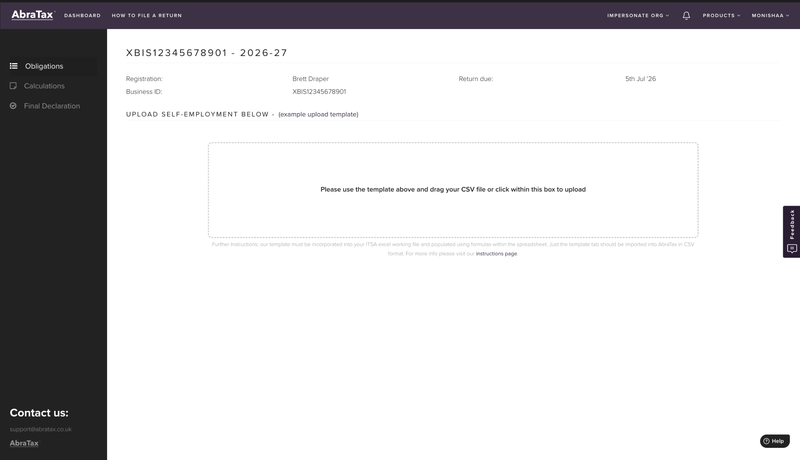
7. Upload and submit. Go to the Obligations tab in your AbraTax dashboard and click Submit Update next to the relevant business or property. Upload your CSV file. AbraTax will show you a review screen so you can check that everything looks correct before anything is sent to HMRC. When you're happy, click Submit to HMRC. AbraTax submissions are sent directly via HMRC's secure MTD API. You will receive a confirmation once it has gone through successfully. If you need to correct something after submitting, you can amend the quarter and resubmit; all amendments are included without extra cost. The whole process from upload to confirmation takes a few minutes. Watch the step-by-step demo of how to file an MTD IT return in AbraTax.
8. Check your tax estimate after submitting. Head to the Calculations tab in AbraTax. You will see an estimated summary of your profit, estimated tax due, and NICs based on the figures you have filed so far. This updates after every quarterly submission, one of the genuine improvements MTD brings over the old once-a-year system.
9. Repeat each quarter; then file your final declaration. You will file 4 quarterly updates across the tax year. After the fourth, you complete the tax return (final declaration) by 31 January. This is where you confirm all your figures, add any non-MTD income, make any adjustments, and submit your final tax position for the year. Once you have done it, each subsequent quarter takes a fraction of the time.
7. Where AbraTax helps with MTD Income Tax
AbraTax is built for people who want to keep using spreadsheets for mtd income tax. You do not need to move to bank feeds, rebuild your bookkeeping process, or learn full accounting software if that is not what you need. Here's what you get:
- Ready-made templates for self-employment, UK property, foreign property, and already set up to work as digital links
- It supports all main business sources, including self-employment, UK property and foreign property.
- File unlimited submissions and amendments with the plan you choose.
- Use built-in validations to check figures before submitting.
- View live tax estimate after every submission, so you always know roughly where you stand
- Get an HMRC submission receipt and confirmation export, so you have a clear audit trail of everything you have filed
- No bank feed required, you upload only the figures HMRC needs, so your bank account stays private
- Use Team Collaboration features such as sharing access with someone else or an accountant.
- Access-Friendly UK-based Support Team
Accountants and agents managing multiple clients, AbraTax's agents platform also provides a central client dashboard, approval workflows, group management, deadline reminders and multi-user access
You can manage all your MTD income tax and VAT submissions from one place.
Try AbraTax for MTD income tax for free.
8. Conclusion:
MTD for income tax looks complicated from the outside. The terminology is unfamiliar, the deadlines are new, and a lot of guidance out there is written around the assumption that you need to buy expensive software to be compliant, but once you understand it, it is actually simple.
- Keep your records digitally.
- Submit your running totals four times a year.
- Add any other taxable income or gains before submitting your tax return by 31 January. That is it!
Check whether you need to sign up on gov.uk, and when you are ready, register for AbraTax to get started. If you already use spreadsheets, you may not need to move to full accounting software. You just need compatible software that connects your records to HMRC.
Sign up for AbraTax and file your first MTD income tax submission for free.
FAQ Questions:
1. What is MTD Income Tax?
Making Tax Digital for Income Tax is HMRC's new way of reporting income from self-employment and property instead of one self-assessment return a year. You keep digital records and send HMRC quarterly updates of your income and expenses through recognised software, plus a final declaration at the end of the year. It applies from:
- 6 April 2026, if your qualifing income from self-employment and property is over £50,000
- April 2027, if it is over £30,000
- April 2028, if it is over £20,000
You can check if and when it applies to you on GOV.UK.
2. Do MTD quarterly updates replace the tax return?
Not on their own. The quarterly updates are summaries of your income and expenses, not tax returns. Nothing is finalised, and no tax is due when you send them. Under Making Tax Digital for Income Tax, you still submit a tax return by 31 January using compatible software. The final declaration is the final step inside that process. That is where you confirm your figures, add any other income, and settle your tax bill. The full picture is five submissions a year: quarterly updates plus one final declaration.
3. Are MTD quarterly updates cumulative?
Yes! This catches a lot of people out. Each update is a running total from the start of the tax year, not just the latest three months. Your 2nd update covers everything from April to September, not just July to September. Your 4th update covers the whole year. The upside is that because updates are cumulative, later updates can include corrected figures without resending every earlier update.
4. Can I use spreadsheets for MTD Income Tax?
Yes, this is probably the most common misconception. HMRC's own guidance confirms that you can keep your records in a spreadsheet and use bridging software to submit them. You do not need to move to a full accounting platform like QuickBooks or Xero unless you want the extra features. If you're happy with Excel or Google Sheets, you can keep using them. AbraTax is built around exactly this route.
5. When is the first MTD Income Tax quarterly update due?
7 August 2026. It covers the first quarter of the 2026/2027 tax year, which runs from 6 April to 5 July 2026. The remaining deadlines for the year are 7 November 2026, 7 February 2027, and 7 May 2027 - always the seventh of the month after the quarter ends. There is some good news if you are nervous: HMRC will not apply penalty points for the late quarterly updates in the first year, but it is still far easier to get set up now than to scramble in July.
6. What happens after the fourth quarterly update?
Complete your final declaration. This is the fifth and final submission of the year. It is where you confirm the figures from your four quarterly updates and any income not covered by MTD (like dividends, savings interest, pension or employment income). Make any adjustments and pay the tax you owe.