


TL;DR: Export your transactions from QuickBooks (Reports → Transaction list by date) to a CSV or Excel file, then upload it to AbraTax and submit to HMRC.
If you are a sole trader or landlord using QuickBooks, there is a reasonable chance you are paying for more than MTD income tax actually requires. HMRC doesn't need bank feeds, payroll modules, or cash flow forecasts.
It needs your records kept digitally and submitted through recognised software. A spreadsheet can handle the records. AbraTax handles the submission. Here's how to get your data out of QuickBooks.
What MTD actually requires:
Under Making Tax Digital for income tax, HMRC requires that you:
- Keep your income and expense records in a digital format.
- Submit quarterly updates and final declaration through HMRC-recognised software.
That's the complete list: no receipt scanning, no cloud sync, no reconciled bank account, just digital records submitted the right way.
AbraTax is HMRC-recognised bridging software. You keep your records in a spreadsheet and submit directly from them.
How to export your record from QuickBooks?
QuickBooks keeps your transaction data in its reports section. Here's the quickest route to a full export:
- Go to Reports in the left navigation bar, select Reports and analytics
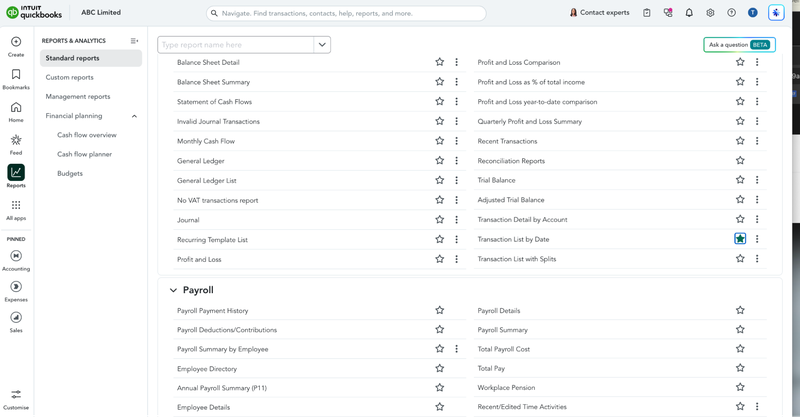
- Under Standard reports, find Transaction List by Date. It's in the main list, right-hand column
- Set the report period to Custom Dates and enter the tax year you want to export (6 April to 5 April).
- Click the three-dot menu icon at the top right of the report view.
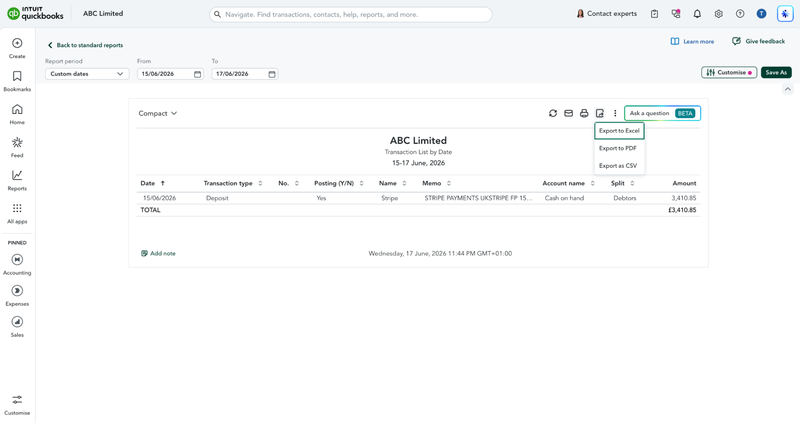
- Select Export to CSV. Excel is also available if you prefer.
Your transactions will download as a spreadsheet with date, type, name, account, and amount columns. Repeat each tax year you want to keep on record.
Optional: Saving your Receipts.
If you've been scanning receipts in QuickBooks and want to keep copies, you can export those too. If you do want to keep them, we'd suggest organising them into folders by tax year (example 2024-25, 2025-26) and saving them as a zip file alongside your spreadsheet records. This keeps everything tidy and easy to find if HMRC ever asks.
You're done
Once you've exported your records. You've got everything you need. Open AbraTax, upload a spreadsheet, and you're ready to submit your quarterly updates to HMRC. No complicated migration, no data transfer, just a spreadsheet and software that actually does what you need.